SDK Compliance Configuration
Upgrade to the latest SDK
Please make sure you have upgraded the Tingyun SDK to the latest version that meets the new regulatory requirements.
SDK Personal Information Collection Instructions
Access Instructions: In order to better assist operation and maintenance R&D personnel in analyzing the crashes, freezes, network anomalies and other problems that affect the user experience when using the App, the SDK will automatically collect some basic information during your use of the mobile App, as follows:
【Required Information】
| Client SDK | Personal Information Type | Purpose of Collection |
| Android SDK | Device Information: Device Model, Device Manufacturer, Operating System Name, Operating System Version, Disk Usage, Memory Usage, CPU Information (Model, Architecture, Usage Rate), Battery Level, Battery Temperature, Root Access, Network Traffic, OAID (Optional), Screen Resolution Application Information: Application Name, Application Package Name, Application Version, Application UI Orientation, Application Channel ID System and Network Information: User ID, Network Type, Network Connection Type, Carrier Name, Server IP Address | Get application performance data on terminal devices and perform statistical analysis |
| iOS SDK | Device Information: Device Model, Device Manufacturer, Operating System Name, Operating System Version, Disk Usage, Memory Usage, CPU Information (Architecture, Usage), Jailbroken Status, Network Traffic, Screen Resolution, Battery Level Application Information: Application Name, Application Package Name, Application Version, Application UI Orientation, Application Channel ID System and Network Information: User ID, Network Type, Network Connection Type, Carrier Name, Server IP Address | |
| Harmony SDK | Device Information: Operating System Name, Network Traffic Application Information: Application Name, Application Package Name, Application Version, Application UI Orientation System and Network Information: User ID, Network Type, Network Connection Type, Server IP Address | |
| WEB SDK | Device Information: Browser, Operating System, Screen Resolution, User Agent, Network Traffic Application Information: Application Package Name System and Network Information: IP Address, Tingyun Device ID, Tingyun SessionID, Carrier Name | |
| Mini Program SDK | Device Information: Device Brand, Device Model, Operating System, Screen Resolution Application Information: Application Package Name, WeChat Version, WeChat SDK Version System and Network Information: IP Address, Tingyun Device ID, Tingyun SessionID, Carrier Name |
【Optional Information】 You can choose whether to allow the [Tingyun User Experience Monitoring SDK] to collect data, depending on your needs.
| Client SDK | Personal Information Type | Collection Purpose |
| Harmony SDK | User ID, Device Model, Device Manufacturer, Operating System Version, Screen Resolution, Carrier Name, Location Information (Not collected by default) | Data Filtering |
| Android SDK | User ID, OAID | Data Filtering |
| iOS SDK | User ID | Data Filtering |
| WEB SDK | Application Version, User ID | Data Filtering |
| Mini Program SDK | Application Version, User ID | Data Filtering |
SDK Optional Personal Information Configuration Instructions
Integration Instructions: For control over the optional personal information collected by the 【Tingyun User Experience Monitoring SDK】, please refer to the relevant integration documentation to understand the impact of not collecting certain information on its functionality. You can configure it reasonably according to your actual business needs.
Harmony SDK Optional Personal Information Collection Configuration
Device Information Collection Configuration
The following information is collected by default; if you need to disable some data collection due to privacy compliance issues, you can disable the corresponding information collection during initialization.
tingyun.init({

// ...other configurations

common: {

  osVersionEnabled: false, // false means do not collect operating system version

  manufacturerEnabled: false, // false means do not collect device manufacturer

  manufacturerModelEnabled: false, // false means do not collect device model

  carrierEnabled: false, // false means do not collect carrier information

  displayResolutionEnabled: false // false means do not collect screen resolution

  }
})
User ID Configuration
User ID is the user identifier; by calling this interface to add a "user identifier," the performance issues of specific users can be retrieved through this identifier on the Tingyun reporting platform.
import tingyun from '@tingyun/sdk-core'

// Set User ID (<userId> is the specific user ID)

tingyun.setUserId('<userId>')
Location Information Configuration
By default, no data is collected. You can set the latitude and longitude through the API to obtain the device's geographical location information.
import tingyun from '@tingyun/sdk-core'

// Location information (<latitude>, <longitude> are specific values)

tingyun.setLatLon(<latitude>, <longitude>)
Android SDK Optional Personal Information Collection Configuration
User ID Configuration
User ID is the user identifier; by calling this API to add a "user identifier," you can retrieve specific user performance issues through this identifier on the Tingyun reporting platform.
/**
* @param userIdentifier Maximum 256 characters, supports Chinese, English, numbers, and underscores, but cannot contain spaces or other escape characters.

*/ NBSAppAgent.setUserIdentifier(String userIdentifier);
OAID Configuration
OAID stands for Open Anonymous Device Identifier; calling this interface allows the Android SDK to use this identifier to generate Tingyun device IDs.
NBSAppAgent.setOaidData("oaid");
iOS SDK Optional Personal Information Collection Configuration
User ID Configuration
User ID is the user identifier; calling this interface to add a "user identifier" allows the Tingyun reporting platform to retrieve performance issues for specific users using this identifier.
/**
* Sets the user identifier, which cannot exceed 256 characters and can be called multiple times at any location (value overridden).

* @userId: Uniquely identifies a user.

*/
+ (void)setUserIdentifier:(NSString *)userId;
WEB SDK Optional Personal Information Collection Configuration
User ID Configuration
User ID is the user identifier; by calling this interface to add a "user identifier," performance issues for specific users can be retrieved through this identifier on the Tingyun reporting platform.
localStorage.setItem('TY_USER_ID', 'user1');
Application Version Configuration
To accurately associate with incorrect JS versions, the user project can globally set the variable TINGYUN_RELEASE on the page. The variable type is an object, and the id attribute identifies the version name. This value must be consistent with the version specified in the previous step in each release.
id: 'V1.0.0'

}
Mini Program SDK Optional Personal Information Collection Configuration
User ID Configuration
User ID is the user identifier; by calling this interface to add a "user identifier," performance issues for specific users can be retrieved through this identifier on the Tingyun reporting platform.
// metaData: Additional information.

const monitor = require('./agent/tingyun-mp-agent.js');

  monitor.setUser('userId', {

  metaData: {

  ...

  }
})
Application Version Configuration
To accurately associate with incorrect JS versions, you can add
monitor.setReleaseIdafter the embedded code in the user project. This value needs to be consistent with the version specified in the previous step for each release. Setting the user ID will delete the default device ID set by Tingyun.
monitor.setReleaseId ('V1.0.0');
SDK application system permission description
Access description: For the optional system permissions of the Tingyun SDK, you can refer to the following table to learn more about the relationship between the relevant permissions and business functions. Failure to apply for relevant permissions will affect the corresponding functions. You can make reasonable configurations based on actual needs.
| Android application permission list | |||
|---|---|---|---|
| Permission | Is it optional | Purpose | Application time |
| android.permission.INTERNET | Required | Used for SDK to report performance data and data analysis | When the SDK is initialized |
| android.permission.ACCESS_NETWORK_STATE | Optional | Used to obtain the network status and WiFi status of the current device, such as: 2G, 3G, 4G, WiFi, recommended to add | When the SDK is initialized |
| android.permission.READ_PHONE_STATE | Optional | Used to obtain the network status of targentVersion 29 and above Android 10 devices | When the SDK is initialized |
| android.permission.SYSTEM_ALERT_WINDOW | Optional | Used to use the "Visual Operation Naming Function" | When the SDK visualization function is enabled |
| android.permission.SYSTEM_OVERLAY_WINDOW | Optional | Used to use the "Visual Operation Naming Function" | When the SDK visualization function is enabled |
| android.permission.ACCESS_COARSE_LOCATION | Optional | Used to obtain the base station information of the current mobile network connection | When the SDK business function is enabled |
| iOS application permission list | |||
| Permission | Is it optional | Purpose | When to apply |
| Network access permission | Required | Used for SDK to report performance data and data analysis | When SDK is initialized |
| Local network access rights | Optional | Used for SDK to perform MTR network detection tasks | When SDK MTR function is enabled |
| Harmony application permission list | |||
| Permissions | Is it optional | Purpose | Application timing |
| ohos.permission.INTERNET | Required | Used for SDK to report performance data and data analysis | When SDK is initialized |
| ohos.permission.GET_NETWORK_INFO | Optional | Get network connection information. After configuration, you can get network type and connection mode information | When SDK business functions are enabled |
| ohos.permission.STORE_PERSISTENT_DATA | Optional | Storage device ID. After configuration, the SDK can obtain the device ID more accurately | When SDK business functions are enabled |
SDK Privacy Policy Terms Example
You must inform users that you have chosen the Tingyun SDK service. Please add the Tingyun SDK Privacy Policy Terms in the privacy policy.
Example of the privacy policy terms of Tingyun SDK:
| Parameters | Example |
|---|---|
| SDK name | Tingyun User Experience Monitoring SDK |
| Collection of personal information | 【Essential Android Information】Device model, manufacturer, operating system name, operating system version, disk usage, memory usage, CPU information (model, architecture, usage rate), battery level, battery temperature, root access status, network traffic, OAID (optional), screen resolution, app name, app package name, app version, app UI orientation, app channel ID, user ID (optional), network type, network connection type, carrier name, server IP address. 【Essential iOS Information】 Device model, manufacturer, operating system name, operating system version, disk usage, memory usage, CPU... Information (architecture, usage), jailbroken status, network traffic, screen resolution, battery level, app name, app package name, app version, app UI orientation, app channel ID, user ID (optional), network type, network connection type, carrier name, server IP address 【Harmony Required Information】Device Information: Operating System Name, Network Traffic, App Name, App Package Name, App Version, App UI Orientation, Network Type, Network Connection Type, Server IP Address 【Harmony Optional Information】User ID, Device Model, Device Manufacturer, Operating System Version, Screen Resolution, Carrier Name, Location Information |
| SDK service provider | Beijing Tingyun Network Co., Ltd. |
| Purpose of use | Perform App performance statistics and analysis |
| Privacy policy | Tingyun SDK Privacy Policy |
Example of end-user consent
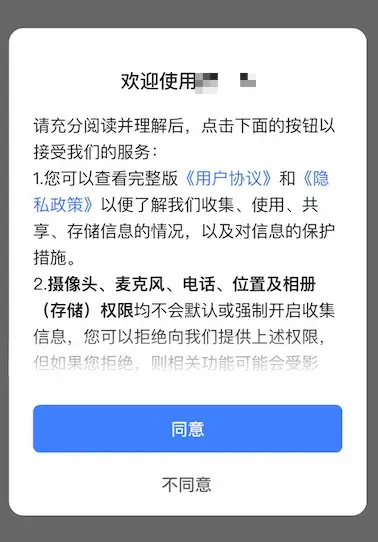
When the APP is run for the first time, there should be a privacy pop-up window. The privacy pop-up window should display the simplified privacy policy content and attach a link to the full privacy policy, and clearly prompt the user to read and choose whether to agree to the privacy policy; the privacy pop-up window should provide an consent button and a rejection button, and the end user should actively choose.
Privacy policy authorization pop-up window example:
SDK initialization timing
Please be sure to initialize the Tingyun SDK after the user agrees to the privacy policy in your APP; Before the user agrees to the privacy policy, avoid dynamically applying for sensitive device permissions involving user personal information; Before the user agrees to the privacy policy, you should avoid privately collecting and reporting personal information. You can follow the steps below to initialize the Tingyun SDK:
- You should ensure that when the App is installed and started for the first time, the Tingyun SDK is initialized for data collection and reporting only after the user agrees to the privacy policy. Conversely, if the user does not agree to the privacy policy, the Tingyun SDK will not be initialized. For specific configuration, please refer to the following code:
- iOS
- Android
- Harmony
- MiniProgram
/** Initialize SDK
*@param appId Tingyun platform App unique identifier
*@param channelId Channel ID, default is AppStore
*/
+(void)startWithAppID:(NSString *)appId channelId:(NSString *)channelId;
// Initialize SDK
// "Appkey" Please obtain from the Keytone Tingyun platform
// "Host" is the "Redirect" server address of the Keytone Tingyun platform, no need to add a protocol header
// setStartOption(7) Set the first startup to enable network, user experience, and crash collection, which only takes effect on the first startup
NBSAppAgent.setLicenseKey("AppKey").setRedirectHost("Host").setStartOption(7).start(this.getApplicationContext());
import tingyun from '@tingyun/sdk-core'
import axios from '@ohos/axios'

export default class EntryAbility extends UIAbility {
  onCreate(want: Want, launchParam: AbilityConstant.LaunchParam): void {
    // Initialize SDK
    tingyun.init({
      // redirect server address, get it on the console settings page
      redirectHost: '<Redirect server address>',
      // appKey, get it on the console settings page
      appKey: '<AppKey>',
      // context
      context: this.context,
      // If using axios, you can pass in the axios object to collect the  network request sent by axios
      axios: axios
    })
  }
  // ...
}
// Directory Structure
// |-- agent
//     |-- tingyun-mp-agent.js
//     |-- init.js

// ==================== init.js Code ====================
const agent = require('./tingyun-mp-agent.js');
agent.config({
    beacon: '<Data upload server address>',
    key: '<Application key>',
    id: '<Account ID>',
    sampleRate: 1
});
module.exports = agent;

// ==================== Import probe at the first line of app.js  ====================
import './agent/init.js';
// Original code of app.js...
- Once the App obtains the privacy policy authorization, the subsequent App cold start developer should ensure that the Tingyun SDK is initialized.
How to contact us
If you have any questions, comments or suggestions about the data collection of Tingyun SDK, or if you need Tingyun to help you turn off certain data collection, please contact our customer service hotline 400-898-9580.