Deployment instructions
Deployment instructions
To implement performance monitoring of mini programs, you need to embed the Keynote Listening Cloud mini program JS probe in the mini program package. The specific steps are as follows.
Create a new application name.
On the Application Overview page, click the Add Application button in the upper right corner to enter the Create Application page, enter the mini program name, and save. The mini program name cannot be repeated.
Download the probe.
WeChat/Alipay/DingDing/Baidu/JingDong/Feishu applet click to download the probe
Directory structure:
|-- mp-sdk-<probe version number>
    |-- Deployment Documentation
    |-- mp_agent-alipay_1.6.1.zip
    |-- mp_agent-baidu_1.6.1.zip
    |-- mp_agent-dd_1.6.1.zip
    |-- mp_agent-feishu_1.6.1.zip
    |-- mp_agent-jd_1.6.1.zip
    |-- mp_agent-wechat_1.6.1.zip
Configuration code, support WeChat/Alipay/Staple/Baidu/JD/Flybook applet.
- Create an
agentfolder in the root directory of the project, copy the probemp_agent_<probe version number>.jsto theagentdirectory, modify the file name according to different end mini programs, and create a newinit.exe
- Integrate in WeChat mini program project, unzip
mp_agent-wechat_<probe version number>.zip, and addmp_agent_<probe version number>.jsto the project; - Integrate in the Alipay applet project, decompress
mp_agent-alipay_<probe version number>.zip, and addmp_agent-alipay_<probe version number>.jsto the project; - Integrate in the DingTalk mini program project, unzip
mp_ogent-dd_<probe version number>.zip, and addmp_ogent-dd_<probe version number>.jsto the project. - In the Baidu Mini Program project, integrate and unzip
mp_agent-baidu_<probe version number>.zip, and addmp_agent-baidu_<probe version number>.jsto the project. - Integrate in the JD mini program project, unzip
mp_agent-jd<probe version number>.zip, and addmp_agent-jd<probe version number>. jsto the project. - Integrate in the Feishu Mini Program project, unzip
mp_ogent-feishu_<probe version number>.zip, and addmp_ogent-feishu_<probe version number>.jsto the project.
Directory structure:
|-- agent
    |-- Mp_agent_<probe version number>.js    //The file name can be modified according to the actual situation
    |-- init.js
- Modify
init.js
Const agent=require ('./mpuagent_<probe version number>. js');
    agent.config({
    Beacon:<Data Upload Server Address>,
    Key:<application key>,
    ID:<Account ID>,
    sampleRate: 1
});

module.exports = agent;
- Introduce probes in the first line of 'app. js'
//Fill in according to the actual path
import './agent/init.js';
// . ..
-
If you call the probe interface on the relevant page, you can import the probe object and use
For example,
pages/index/index.jsneeds to call the probe interface. The example of introducing the probe is as follows:// Import the probe object, set the name to Tingyun (customizable), and fill in the actual path
import Tingyun from '../../agent/init.js';
Page({
callTingyunAgent() {
// const action = Tingyun.newAction({
// // ...
// })
}
})
Note:
- If the probe is placed in another directory, the probe address of the following code must be changed synchronously.
- The probe starts plug-in monitoring by default, but WeChat SDK versions below 2.6.4 do not support it. If monitoring is required, you can customize the configuration implementation. The implementation method is the same as the plug-in support. You can view [Support Document](./../../../../docs/doc\mp/Function Description/Application Settings.md).
Configure the request legal domain name.
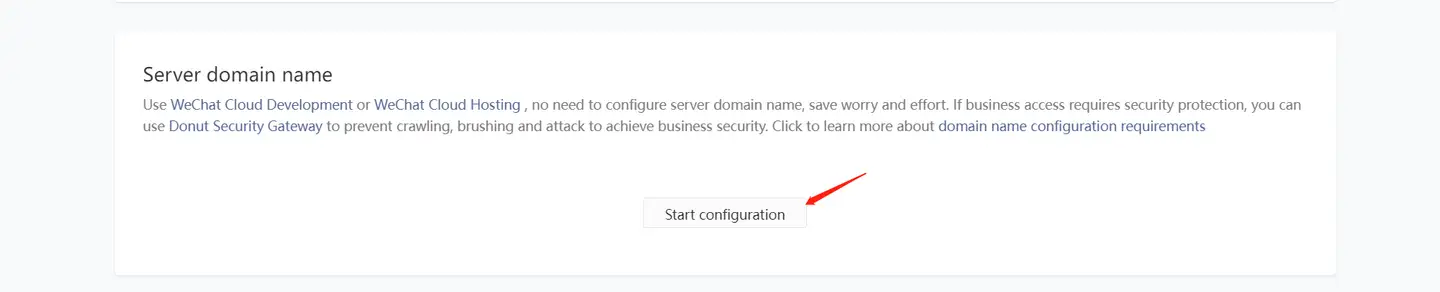
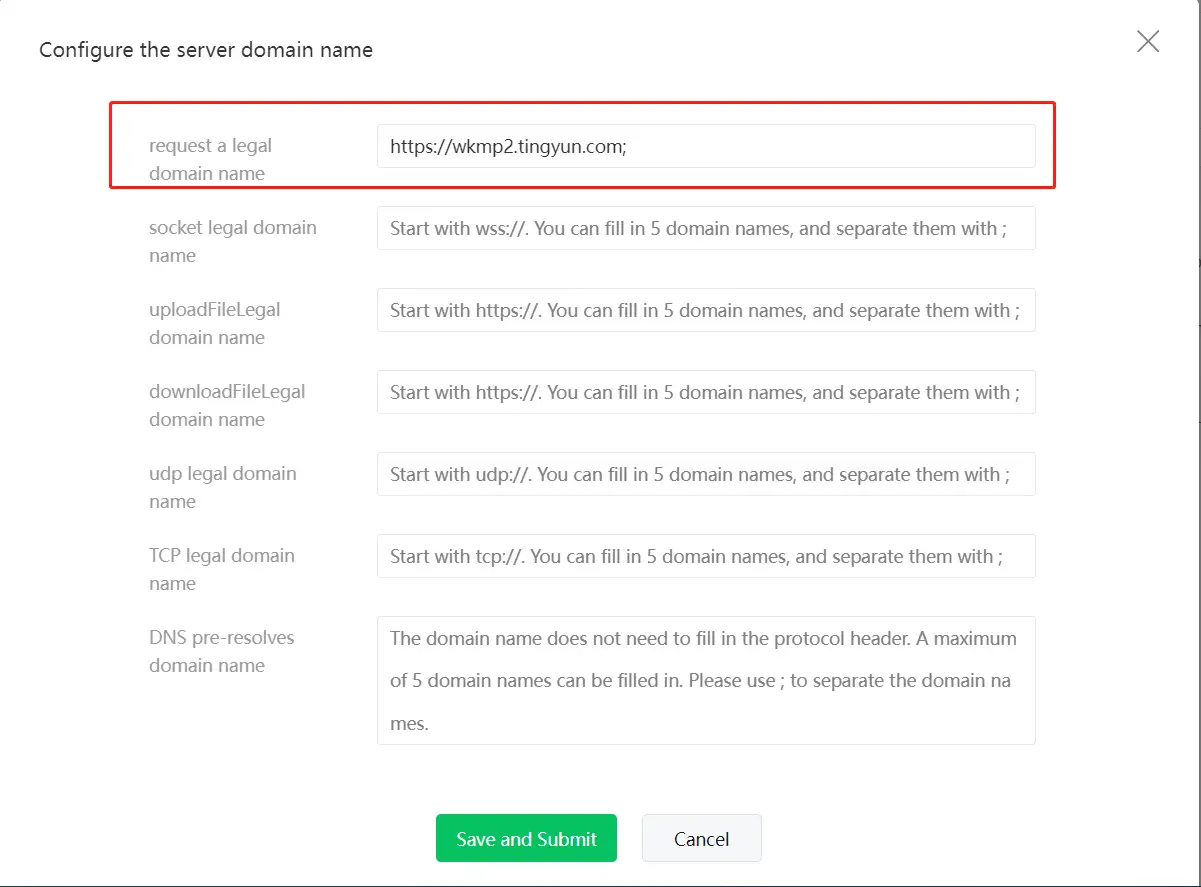
After copying the domain name address, add the server address of the Keynote Listening Cloud to receive probe data in Development Settings>Server Domain Name>request Legal Domain Name in the WeChat Mini Program backend, as shown in the figure below:
After the configuration is completed and the mini program is published, you can see the real-time performance data in the Keynote Listening Cloud mini program console.
Compliance Configuration
To ensure that your application complies with personal information protection regulations, it is recommended to initialize the [Tingyun User Experience Monitoring SDK] for data collection and reporting only after users have explicitly agreed to the privacy policy.
Recommended Solution
- Home screen control: Do not execute the initialization logic of the SDK until the user clicks the "Agree" button.
- State persistence: After the user agrees, the business side needs to record the consent status in the local cache (Storage) for automatic initialization during subsequent startup.
- Dynamic loading: It is recommended to dynamically import the SDK using the
requiremethod to ensure that the probe code is not triggered before user consent is obtained.
Example code:
// This example is for reference only, and specific implementation should be based on actual business needs.
// 1.  app.js only needs to import the current file, and whether to start the probe is controlled by this file.
// 2.  When starting for the first time, the business side should first use wx.getPrivacySetting to determine whether authorization is required.
// 3.  After the user clicks the official "Agree" button, startAgent() is called.
// 4.  In this example, privacyConsent is used as a local synchronization marker to facilitate the early initiation of probes during subsequent cold starts.
let started = false;

function hasPrivacyConsent() {
  return wx.getStorageSync('privacyConsent') === 'granted';
}

function startAgent() {
  if (started) {
    return;
  }

  // Defer loading the probe body to avoid executing the probe code prematurely before consenting to privacy.
  const agent = require('./tingyun-mp-agent.js');

  agent.config({
    beacon: <Data upload server address>,
    key: <application key>,
    id: <account id>,
    sampleRate: 1
  });

  started = true;
}

// If the business side has written privacyConsent='granted' after agreeing to the callback, the probe will be automatically launched during subsequent cold starts.
if (hasPrivacyConsent()) {
  startAgent();
}

export {
  hasPrivacyConsent,
  startAgent,
};