App Exit Reasons
App exit reason analysis is currently supported only on Android 11/API 30 and later. Versions earlier than Android 11 are not supported.
App exit reasons help you analyze why Android app processes exit. They can help you determine whether an app was terminated by the user, reclaimed by the system, crashed, became ANR, was killed during an app update, or exited for another reason. You can also review the impact scope, trend changes, device distribution, and the context of a single exit event.
With this feature, you can quickly understand app exits, such as:
- How many users and devices reported exit reasons within the selected time range.
- Which exit reason has the highest proportion, such as Java crash, Native crash, ANR, user-requested termination, and so on.
- Which app versions, operating systems, or device models a specific exit reason is mainly concentrated in.
- What the user did before a single exit occurred, and whether the event can be associated with session replay, exception tracing, or Dump files.
Open the App Exit Reasons Page
Navigation path:
Mobile / App / Target App / App Exit Reasons
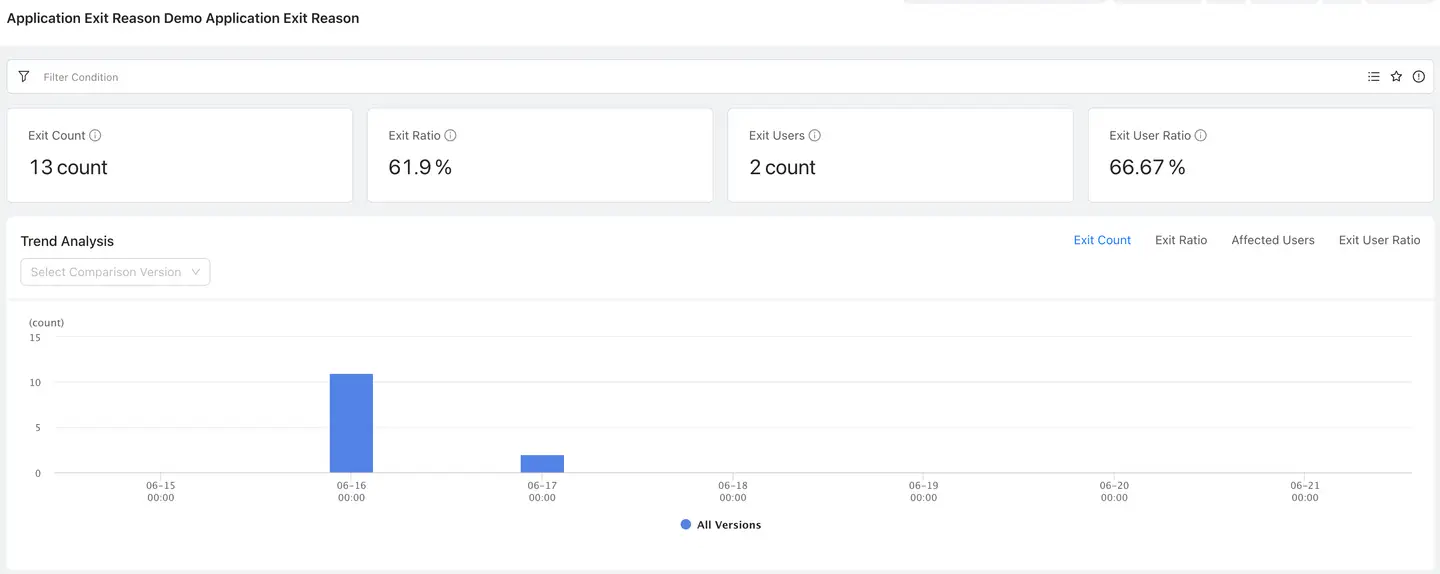
After you enter the page, the top area displays global toolbar controls such as the current app, time range, and refresh interval. The main page includes filters, metric cards, trend analysis, dimension analysis, and the app exit reason list.
View Core Metrics
The top area of the page displays core metrics under the current filters:
| Metric | Description |
|---|---|
| Exits | Number of app exits collected under the current filters |
| Exit Rate | App exits / app launches under the current filters |
| Users with Exits | Number of users who experienced app exits under the current filters |
| User Exit Rate | Users with app exits / active users under the current filters |
When you adjust the time range or filters, the metric cards, trend analysis, dimension analysis, and list data are updated at the same time.
Locate Issues with Filters
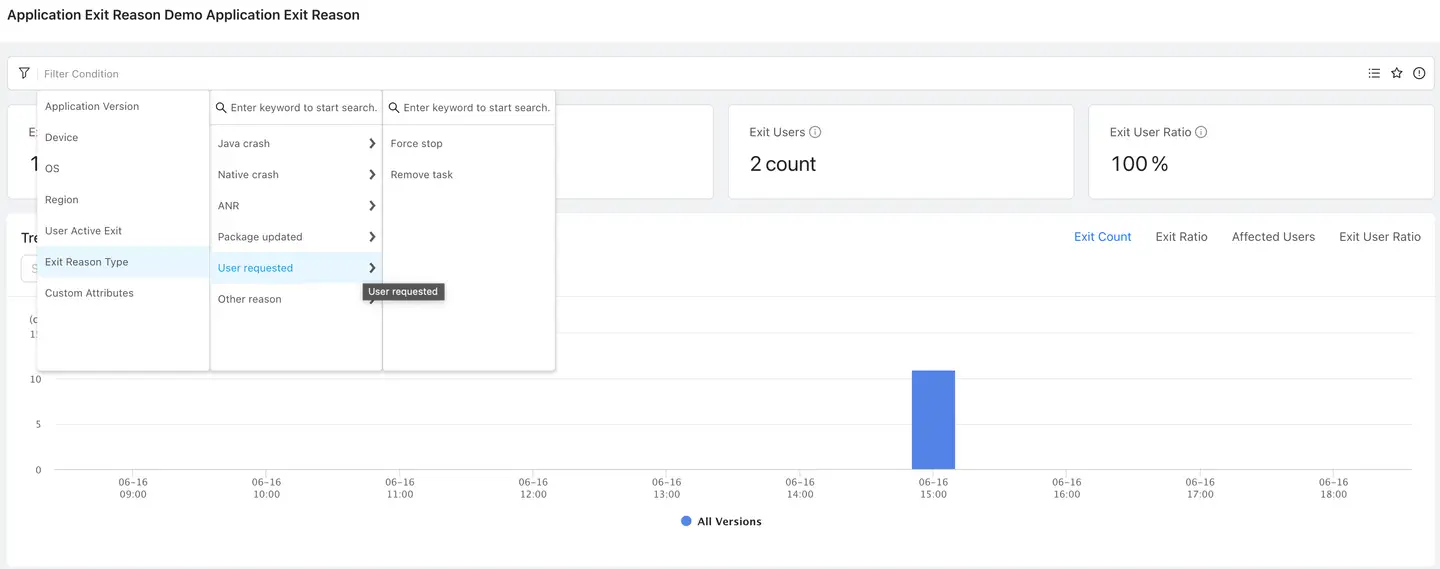
Click the filter bar at the top of the page to filter data by app version, device, operating system, region, whether the user actively exited, exit reason type, custom attributes, and other conditions.
In Exit Reason Type, the system displays primary exit reasons, such as:
- Java crash
- Native crash
- ANR
- App updated
- User-requested termination
- Other reasons
After you select a primary exit reason, you can continue to select the corresponding exit subreason, such as force stop or remove task.
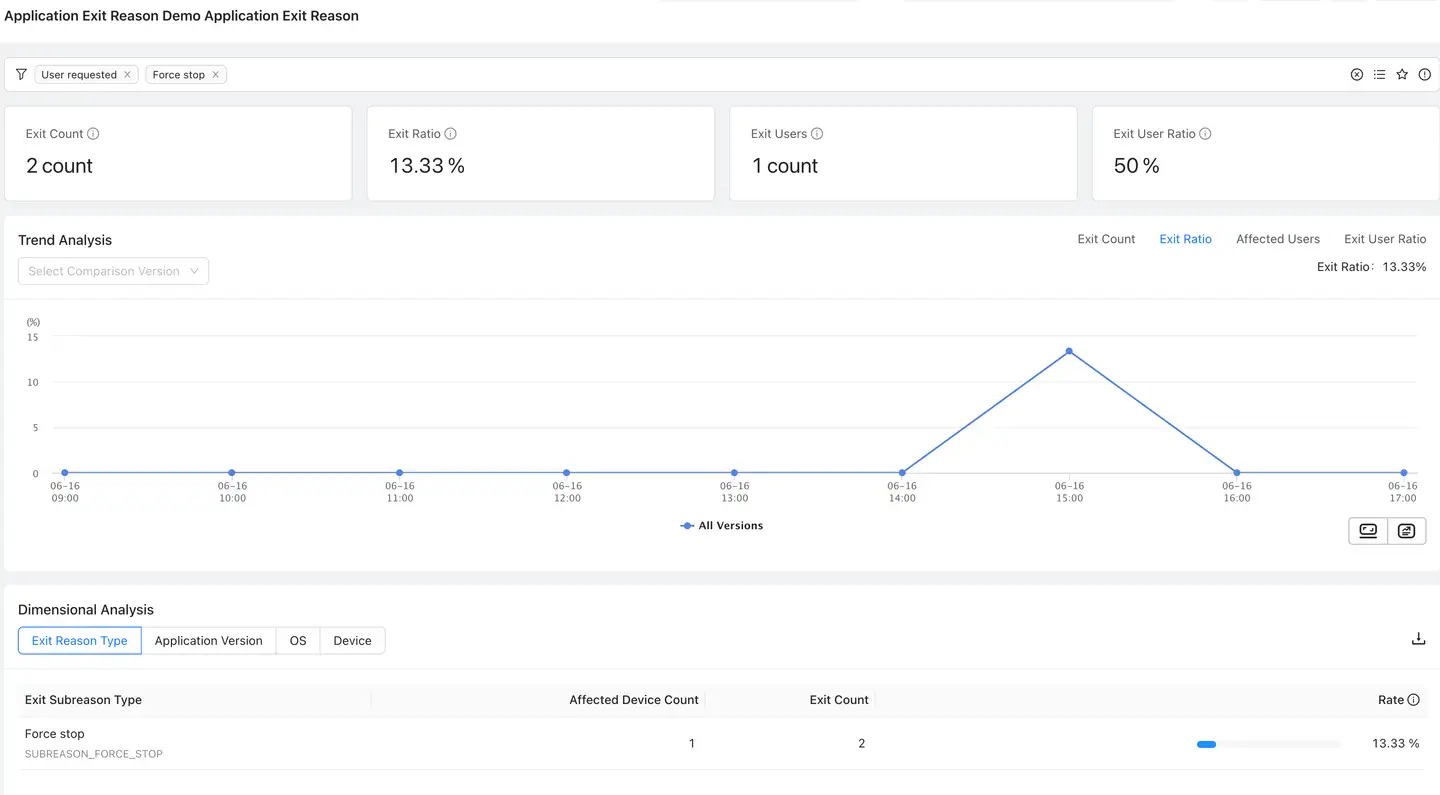
After filters take effect, selected filter tags are displayed in the upper-left area of the page. Click the close button on the right side of a tag to remove that filter.
Analyze Exit Trends
Trend analysis shows how app exits change over time. The following metrics can be switched in the upper-right corner:
- Exits
- Exit Rate
- Users with Exits
- User Exit Rate
When Exits is selected, the chart displays the number of exits at each time point as a bar chart. When a ratio metric such as Exit Rate is selected, the chart displays the trend as a line chart.
Compare App Versions
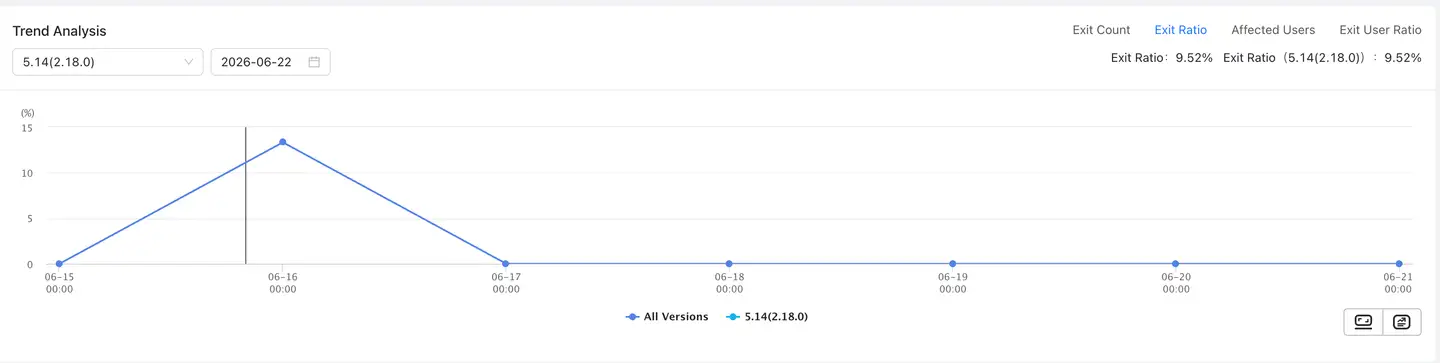
In the upper-left corner of the trend analysis area, you can select versions for comparison. After versions are selected, the chart displays data for all versions and the selected versions at the same time, helping you determine whether exits increased abnormally in a specific version.

Hover over a data point in the trend chart to view detailed data at that time point, such as exit rate, exits, and launches.
View Dimension Analysis
Dimension analysis shows the distribution of app exits across different dimensions. The following dimensions are currently supported:
- Exit reason type
- App version
- Operating system
- Device model
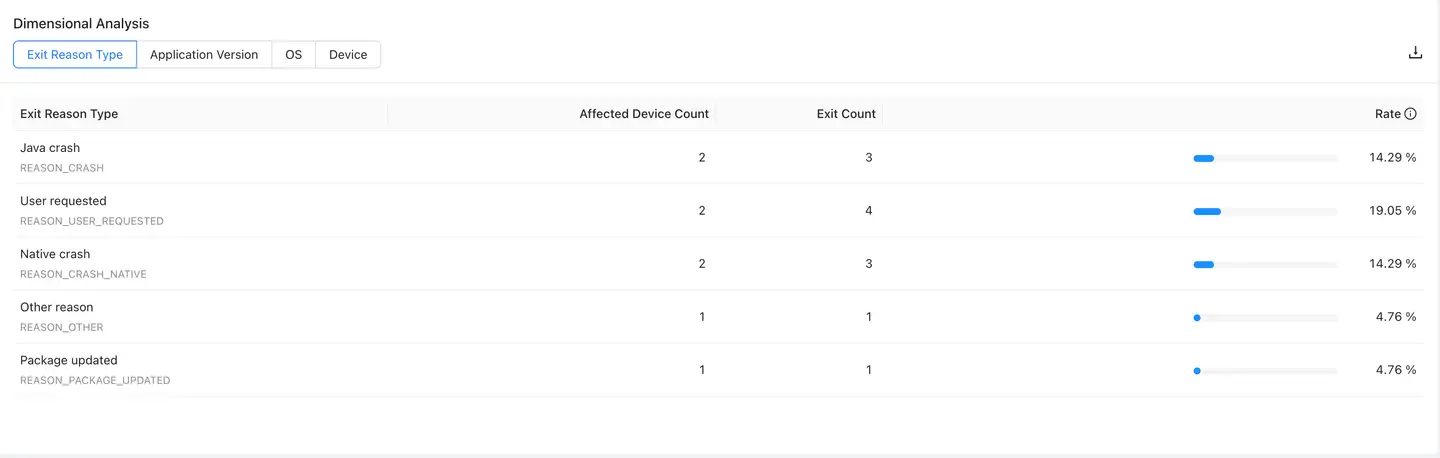
The table displays affected devices, users with exits, exits, and proportion. You can use the proportion and count to decide which direction to investigate first.
When no specific exit reason type is selected, the Exit Reason Type dimension displays the distribution of primary reasons. When a primary exit reason has been filtered, this dimension further displays the distribution of subreasons under that reason.
View the App Exit Reason List
The app exit reason list is aggregated by exit reason + exit subreason instead of displaying logs one by one. The list helps you quickly identify exit issues that need attention.
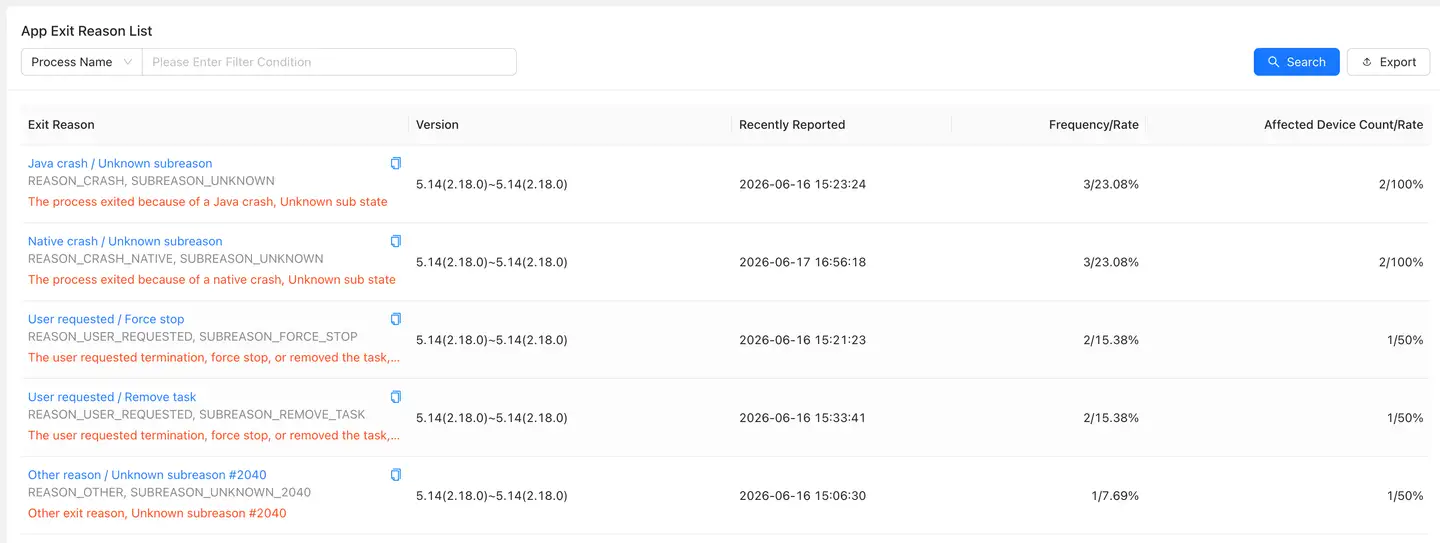
List fields:
| Field | Description |
|---|---|
| Exit Reason | Aggregated exit reason, including the display name, system code, and reason description |
| Version | App version range related to this exit reason |
| Last Reported | Time when this exit reason was most recently collected |
| Occurrences/Proportion | Number and proportion of occurrences for this exit reason |
| Affected Devices/Proportion | Number and proportion of devices affected by this exit reason |
The top of the list supports searching by fields, such as entering keywords by process name. Click Export to export the current list data.
Click an exit reason name in the list to open the exit reason detail page.
View Exit Reason Details
The exit reason detail page displays the overview, sample list, device information, exit information, exception tracing, and file downloads for a specific category of exit reason.
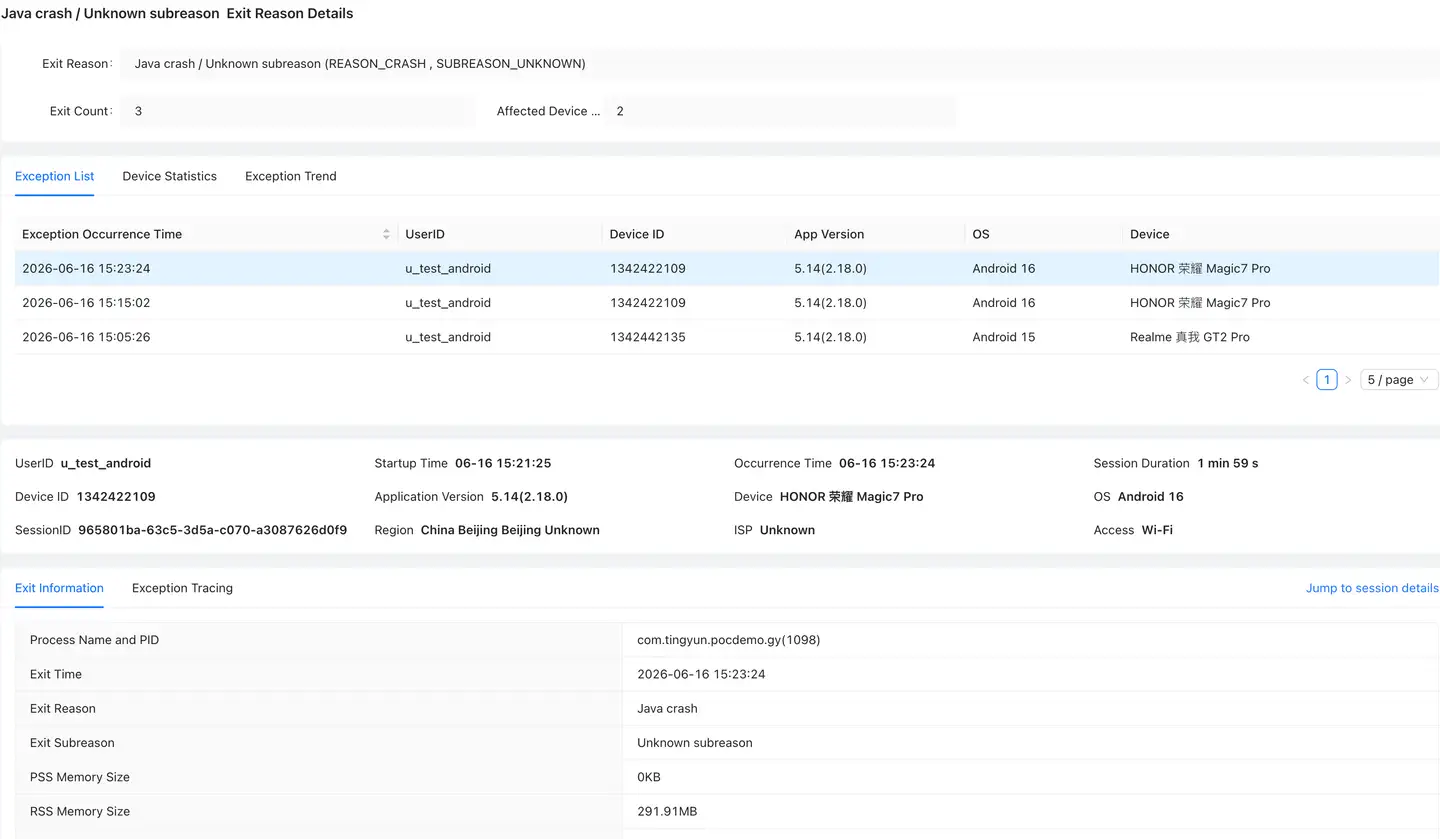
Overview
The overview displays basic statistics of the current aggregated issue, including:
- Exit reason
- System code
- Exits
- Affected devices
The upper-right corner of the page supports generating a share link, so you can send the current issue to other members for collaborative troubleshooting.
Exception List
The exception list displays specific samples under this exit reason. Common fields include:
- Exception time
- UserID
- Device ID
- App version
- Operating system
- Device model
After you click a sample, the corresponding device context data and exit information are displayed below.
Device Context Data
Device context data restores the user and device environment when the exit occurred, including:
- UserID, device ID, SessionID
- Launch time, occurrence time, session duration
- App version, device model, operating system
- Region, carrier, access method
This information can help you determine whether the issue is concentrated in specific users, devices, system versions, or network environments.
View Exit Information
Select the Exit Information tab at the bottom of the detail page to view the process and exit details of the current sample, such as:
- Process name and PID
- Exit time
- Exit reason
- Exit subreason
- PSS memory size
- RSS memory size
- Description
- Exit signal
- Importance information
These fields can help you determine the process state, exit type, and additional information returned by the system when the exit occurred.
View Exception Tracing
Select the Exception Tracing tab to view user actions and page paths before and after the exit. The page displays the action name, page name, and time distance from the exit event in a timeline.
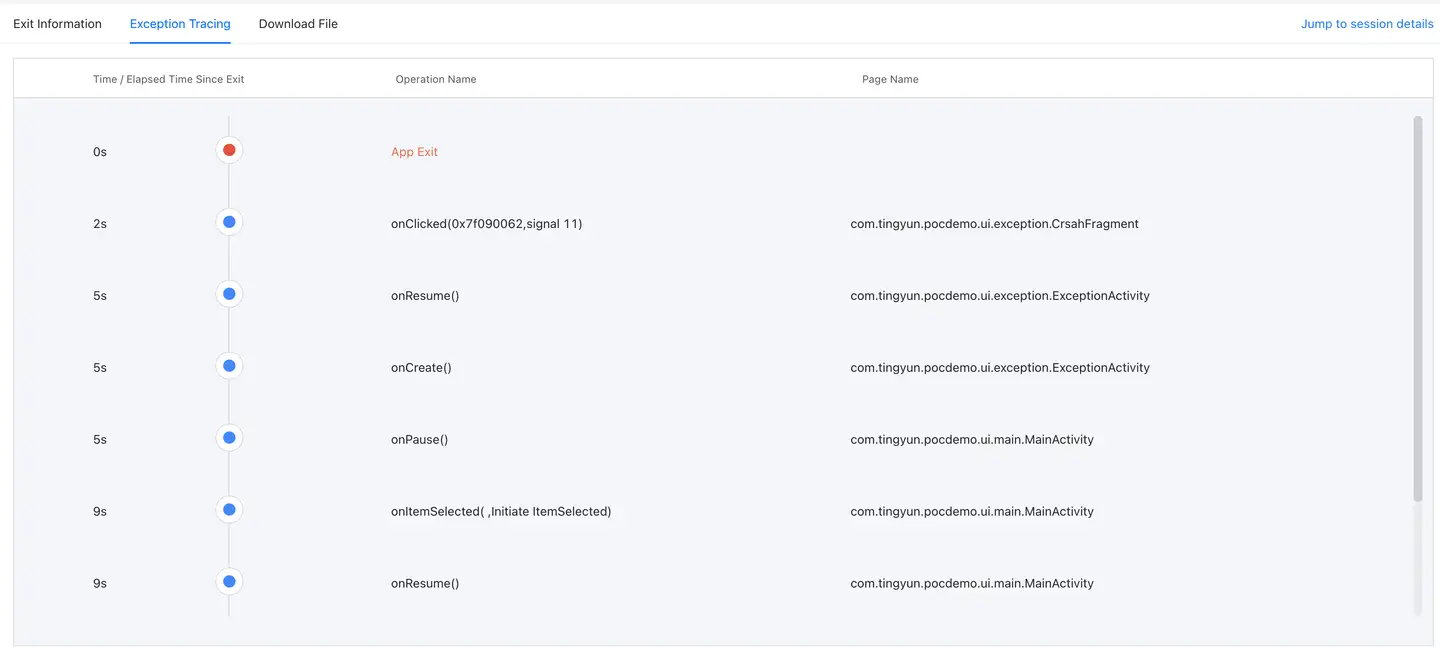
With exception tracing, you can observe whether the user performed a specific action before the exit occurred, such as tapping a button, switching pages, or moving the app between foreground and background, helping you determine whether the exit reason is related to a business operation.
Download Dump Files
Select the File Download tab to download files associated with the current sample.

Only the following exit types include Dump files:
-
ANR: Supports downloading the Dump file related to this ANR, which contains the corresponding ANR trace text.
-
Native crash: Android 12/API 31 and later support obtaining the tombstone trace file corresponding to a Native Crash. The file is encoded in Protobuf format and can be parsed by referring to the tombstone.proto structure in Android AOSP.
Other exit types do not include Dump files by default. If no downloadable file is generated for the current sample, the File Download tab may be empty or may not show any download item.
Open Session Details
On the exit reason detail page, click Go to Session Details to open the session replay detail page corresponding to the sample.
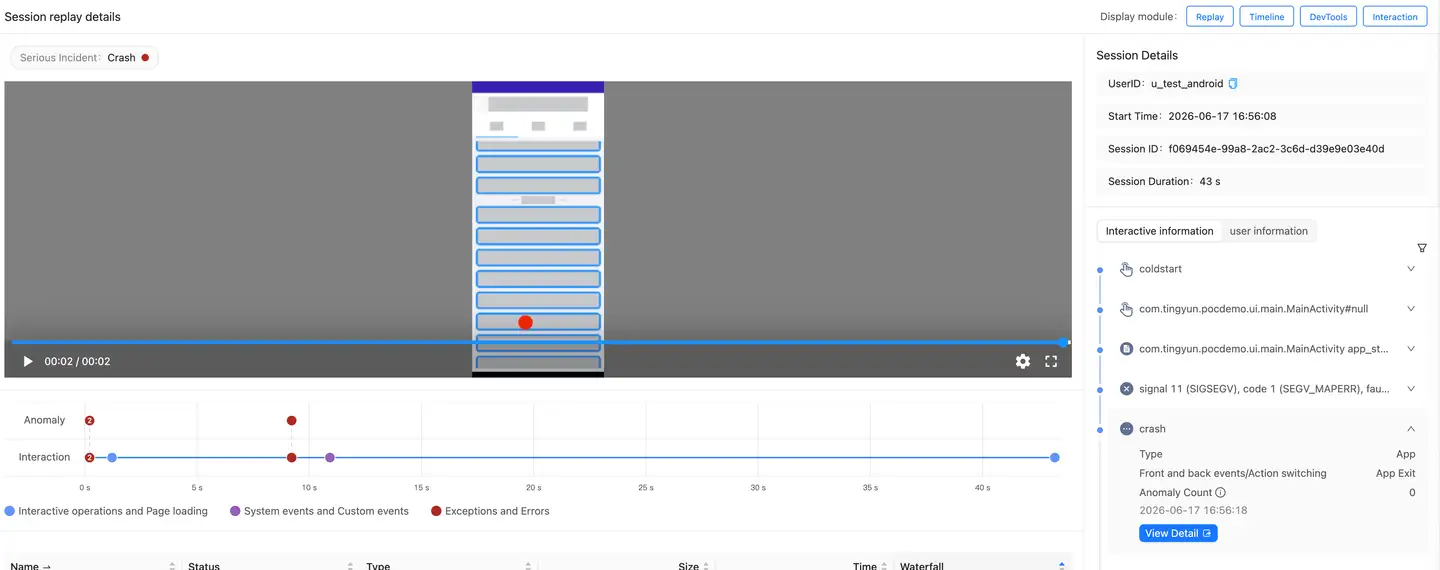
The session details page provides:
- Replay: session replay
- Timeline: timeline
- DevTools: debugging information such as network requests and resource loading
- Interaction: interaction operations and page events
When an exit reason event exists in the session, you can view the corresponding event in the timeline and troubleshoot it together with user actions, page visits, and network requests.
Supported Exit Reason Types
Value: The integer value returned by ApplicationExitInfo.getReason().
Constant Name: The constant field name used when the app exits.
| Value | Constant Name | Description | Notes |
|---|---|---|---|
| 0 | REASON_UNKNOWN | Unknown reason | The system recorded that the process exited, but did not obtain enough information to classify it into a more specific exit path. This usually means the result is known but the full context is missing, such as missing supplementary information, an uncovered path, or an unmapped vendor extension. |
| 1 | REASON_EXIT_SELF | Process exited voluntarily | The process ended by itself instead of being forcibly killed by AMS, LMKD, or an external system component. Common cases include the app calling System.exit(), native code calling exit() or _exit(), or a daemon process actively finishing its work. |
| 2 | REASON_SIGNALED | Terminated by signal | The process ended after receiving a Unix signal, such as SIGKILL, SIGTERM, or SIGABRT. This indicates that the exit was triggered by a signal, but does not directly identify whether the signal came from the system, kernel, shell, or another process. Check the subreason or logs for more context. |
| 3 | REASON_LOW_MEMORY | Low-memory exit | The system actively terminated the process to free RAM after entering a memory pressure state. Common scenarios include LMKD/AMS reclaiming background, cached, or empty processes. This is one of the most typical system-driven process termination reasons on Android. |
| 4 | REASON_CRASH | Java crash | An uncaught exception occurred in the Java/Kotlin layer, eventually causing the main thread or a critical thread to terminate abnormally. The system records this as a Java crash. It usually corresponds to logs such as FATAL EXCEPTION, RuntimeException, or NullPointerException. |
| 5 | REASON_CRASH_NATIVE | Native crash | The process crashed in the native layer, such as a segmentation fault, illegal instruction, heap corruption, or abort. It is usually accompanied by tombstone, SIGSEGV, SIGABRT, backtrace, and similar information. This applies to JNI, C/C++ libraries, rendering engines, third-party .so files, and similar native components. |
| 6 | REASON_ANR | ANR | The app did not respond to input, broadcast, Service, or ContentProvider calls for a long time. The system triggered the ANR flow and may terminate the process after the user chooses to close it, due to system governance, or during subsequent recovery. |
| 7 | REASON_INITIALIZATION_FAILURE | Initialization failure | The process failed during the early creation phase, such as Application initialization, preparation of key system dependencies, process binding, or runtime startup. The system considers that the process failed to establish a valid running state. |
| 8 | REASON_PERMISSION_CHANGE | Permission change | Key permissions of the app changed while it was running, such as permissions being revoked, restricted policies changing, or authorization status being modified by the user or system. The system terminates the existing process so the new permission state can take effect. |
| 9 | REASON_EXCESSIVE_RESOURCE_USAGE | Excessive resource usage | The app used or consumed resources abnormally, such as CPU, memory, Binder, broadcasts, or background behavior, and was terminated after reaching a system governance threshold. This emphasizes resource abuse or excessive usage, and does not necessarily refer only to memory. |
| 10 | REASON_USER_REQUESTED | User-requested termination | A user-level explicit termination action occurred, such as Force stop in Settings, cleanup actions from some system UIs, or associated process termination triggered after removal from recent tasks. This means the exit aligns with user intent. |
| 11 | REASON_USER_STOPPED | User stopped process | Usually corresponds to a stronger "stop" operation performed by the user on the app, user space, or related runtime entity. It is not just a regular process kill; it carries system semantics that stop the entity from continuing to run, being relaunched, or being kept alive. |
| 12 | REASON_DEPENDENCY_DIED | Dependency process died | A critical host, sandbox, zygote-derived relationship, bound service, or associated process that the current process depended on died first. The current process could no longer continue running, so the system terminated it as a consequence. |
| 13 | REASON_OTHER | Other reason | The system confirmed that the exit reason does not belong to any defined primary category, or the current path is grouped into a fallback category. Compared with UNKNOWN, this more often means there is a reason, but it is not separately categorized or publicly exposed. |
| 14 | REASON_FREEZER | Freezer termination | Related to the process freezer mechanism. The app was terminated through the Freezer path because an issue occurred while it was frozen, thawed, or governed for frozen-state communication, or because it was no longer suitable to keep. This usually needs to be interpreted together with the corresponding subreason. |
| 15 | REASON_PACKAGE_STATE_CHANGE | Package state change | The app package state changed, such as enable/disable status, component switches, or policy changes, and the call path did not require preserving the existing process. The system directly terminates the running process so the new package state can take effect immediately. |
| 16 | REASON_PACKAGE_UPDATED | Package updated | A new app version was installed, an app was overwritten, split packages were updated, or a system component was replaced. The old process would continue holding old code and resources, so the system usually kills the old process before subsequent launches enter the new version environment. |
- Exit Subreasons
Value: The integer value returned by ApplicationExitInfo.toString().
Constant Name: The subreason constant field name used when the app exits.
| Value | Constant Name | Description | Notes |
|---|---|---|---|
| 0 | SUBREASON_UNKNOWN | Unknown subreason | The system did not obtain a more specific subreason, or the current process-kill path does not provide a finer category. Usually only the primary reason can be determined, and the exact scenario cannot be further classified. |
| 1 | SUBREASON_WAIT_FOR_DEBUGGER | Waiting for debugger | After startup, the process entered the "waiting for debugger to connect" state and did not continue execution for a long time. The system eventually handled it as a special-state process. Common cases include development debugging, suspended breakpoints, or waitForDebugger. |
| 2 | SUBREASON_TOO_MANY_CACHED | Too many cached processes | The system detected too many cached processes and actively eliminated some of them to reclaim memory, compress the LRU list, or maintain the background process count limit. The key point is that the number of cached processes exceeded the threshold. |
| 3 | SUBREASON_TOO_MANY_EMPTY | Too many empty processes | Triggered when the number of empty processes exceeds the system threshold. Empty processes usually have no active components and only retain a process shell, so the system prioritizes cleaning them up to reduce memory usage. |
| 4 | SUBREASON_TRIM_EMPTY | Empty process trimmed | Triggered when the system trims empty processes. It means the process was treated as an idle empty process that could be directly reclaimed. This is closer to a routine background cleanup action. |
| 5 | SUBREASON_LARGE_CACHED | Large cached process | A cached process itself used too much memory. Even if the total number of cached processes is not necessarily excessive, a single oversized process may be reclaimed first. The key point is that one cached process is too large. |
| 6 | SUBREASON_MEMORY_PRESSURE | Memory pressure | The system was under overall memory pressure, and AMS/LMKD/memory reclaim paths selected this process to terminate to relieve pressure. This is a typical case where the process is passively sacrificed because the system is short of memory. |
| 7 | SUBREASON_EXCESSIVE_CPU | Excessive CPU usage | The process continuously used high CPU or abnormally competed for compute resources, affecting system smoothness or power consumption. The system may terminate the process directly. This is more related to abnormal resource usage governance. |
| 8 | SUBREASON_SYSTEM_UPDATE_DONE | System update completed | After a system upgrade, component update, or certain system-level switch completed, the system reclaimed old process instances so new code or resources could take effect and old environments would not continue running. |
| 9 | SUBREASON_KILL_ALL_FG | Kill all foreground processes | Used when the system performs a special operation to clear all foreground-related processes. This is not ordinary background reclaim; it is a centralized termination for foreground-visible or foreground-associated processes. |
| 10 | SUBREASON_KILL_ALL_BG_EXCEPT | Kill background processes | The system batch-cleans background processes while keeping allowlisted, critical, or specifically exempted objects. Common scenarios include extreme memory reclaim, system maintenance, or specific cleanup policies. |
| 11 | SUBREASON_KILL_UID | Kill specified UID | The system cleans up an entire group of processes by UID instead of killing only a single PID. In other words, multiple processes under the same app or UID may be handled together. |
| 12 | SUBREASON_KILL_PID | Kill specified PID | A specific PID is explicitly targeted for termination. Compared with KILL_UID, this precisely targets a single process instance. |
| 13 | SUBREASON_INVALID_START | Invalid start | The process startup flow failed, such as because required state was not satisfied, startup parameters were invalid, or the process failed immediately after being launched. The system therefore aborted this startup attempt and cleaned up the corresponding process. |
| 14 | SUBREASON_INVALID_STATE | Invalid state | The process was in a state that the system considered illegal or inconsistent, such as abnormal lifecycle, scheduling state, or component state. Keeping it could introduce risk, so it was cleaned up. |
| 15 | SUBREASON_IMPERCEPTIBLE | Imperceptible background process killed | The process was in a background state that was imperceptible to the user, while system resources were tight or foreground load was high. The system prioritized reclaiming this type of process because it had the least impact on current user experience. |
| 16 | SUBREASON_REMOVE_LRU | Removed from LRU | The system removed a long-unused process from the tail of the background queue according to the least recently used (LRU) policy. This reflects elimination based on historical usage recency. |
| 17 | SUBREASON_ISOLATED_NOT_NEEDED | Isolated process no longer needed | An isolated process was no longer needed after completing its task, such as after a service call ended or a temporary sandbox task completed. The system actively cleaned it up. |
| 18 | SUBREASON_CACHED_IDLE_FORCED_APP_STANDBY | Cached idle process in forced app standby killed | The app had been forced into standby or a restricted state, and the process was cached and idle for a while. The system considered it no longer worth keeping and terminated it. |
| 19 | SUBREASON_FREEZER_BINDER_IOCTL | Freezer Binder IOCTL | While the process was in a freezer/frozen-related state, a Binder IOCTL interaction issue occurred, indicating that the frozen process was no longer suitable to participate in IPC. The system therefore ended it. |
| 20 | SUBREASON_FREEZER_BINDER_TRANSACTION | Freezer Binder transaction | A Binder transaction exception occurred while the process was frozen, such as the target endpoint being dead, the transaction being unable to complete, or communication being unrecoverable in the frozen state. The system terminated the process with this subreason. |
| 21 | SUBREASON_FORCE_STOP | Force stop | The process was killed through a force-stop path, usually corresponding to Force stop in Settings, system/device management policies, or forced termination triggered by certain package management operations. It emphasizes force-stop semantics rather than ordinary reclaim. |
| 22 | SUBREASON_REMOVE_TASK | Remove task | After a user or the system removed a task stack or recent task, processes strongly associated with that task were cleaned up together. This commonly appears when process reclaim is triggered after swiping an app away from recent tasks. |
| 23 | SUBREASON_STOP_APP | Stop app | The app was stopped. Semantically, this is stronger than ordinary background reclaim and usually means the system explicitly required the app to exit its running state. |
| 24 | SUBREASON_KILL_BACKGROUND | Killed in background | The process was killed by a background cleanup policy. This usually means it was no longer in the foreground and was not an object that needed to be kept alive, making it a common background governance termination. |
| 25 | SUBREASON_PACKAGE_UPDATE | Killed during package update | During app installation, upgrade, replacement, overwrite installation, or system component update, the system kills existing processes first to prevent them from continuing to hold old code or resources before the update completes. |
| 26 | SUBREASON_UNDELIVERED_BROADCAST | Undelivered broadcast cleanup | There were broadcast records that had not been delivered or could no longer be delivered. When cleaning up related state, the system also terminated the process to avoid leftover broadcast queues or inconsistent state. |
| 27 | SUBREASON_SDK_SANDBOX_DIED | SDK Sandbox died | The process related to SDK Sandbox had crashed or exited abnormally. The host side records this subreason to indicate that the issue was not a normal app-logic exit, but was caused by the sandbox side failing first. |
| 28 | SUBREASON_SDK_SANDBOX_NOT_NEEDED | SDK Sandbox cleanup | The SDK Sandbox was no longer needed after completing its task, so the system reclaimed the sandbox process. This is closer to normal cleanup after the lifecycle ends. |
| 29 | SUBREASON_EXCESSIVE_BINDER_OBJECTS | Excessive Binder objects | The process held or created an abnormally large number of Binder objects, which could cause kernel resource pressure, handle expansion, or stability risks. The system therefore triggered protective termination. |
| 30 | SUBREASON_OOM_KILL | Killed directly by OOM | The process was killed directly through the low-memory killer OOM path, indicating that the system had entered a stronger memory reclaim phase. Compared with general MEMORY_PRESSURE, this is closer to direct memory elimination. |
| 31 | SUBREASON_FREEZER_BINDER_ASYNC_FULL | Freezer async Binder queue full | The async Binder queue corresponding to the frozen process was full, so new async transactions could not be enqueued. This indicated a communication blocking risk in the frozen state, so the system handled the process. |
| 32 | SUBREASON_EXCESSIVE_OUTGOING_BROADCASTS_WHILE_CACHED | Excessive outgoing broadcasts while cached | Although the process was cached, it still sent a large number of broadcasts. This did not match the expected behavior of a cached background process, so the system considered its background activity abnormal and cleaned it up. |
Configure Exit Reason Collection
If there is no exit reason data on the page, first confirm that exit reason collection has been enabled in the app configuration.
Navigation path:
Mobile / App / Target App / App Settings / Security Settings
In the Exceptions module, find Exit Reasons and turn on the switch to collect exit reason data. The page also supports setting a file threshold. The default value is 1024 KB, and the threshold range is [0,5120]. Files larger than the threshold are discarded.
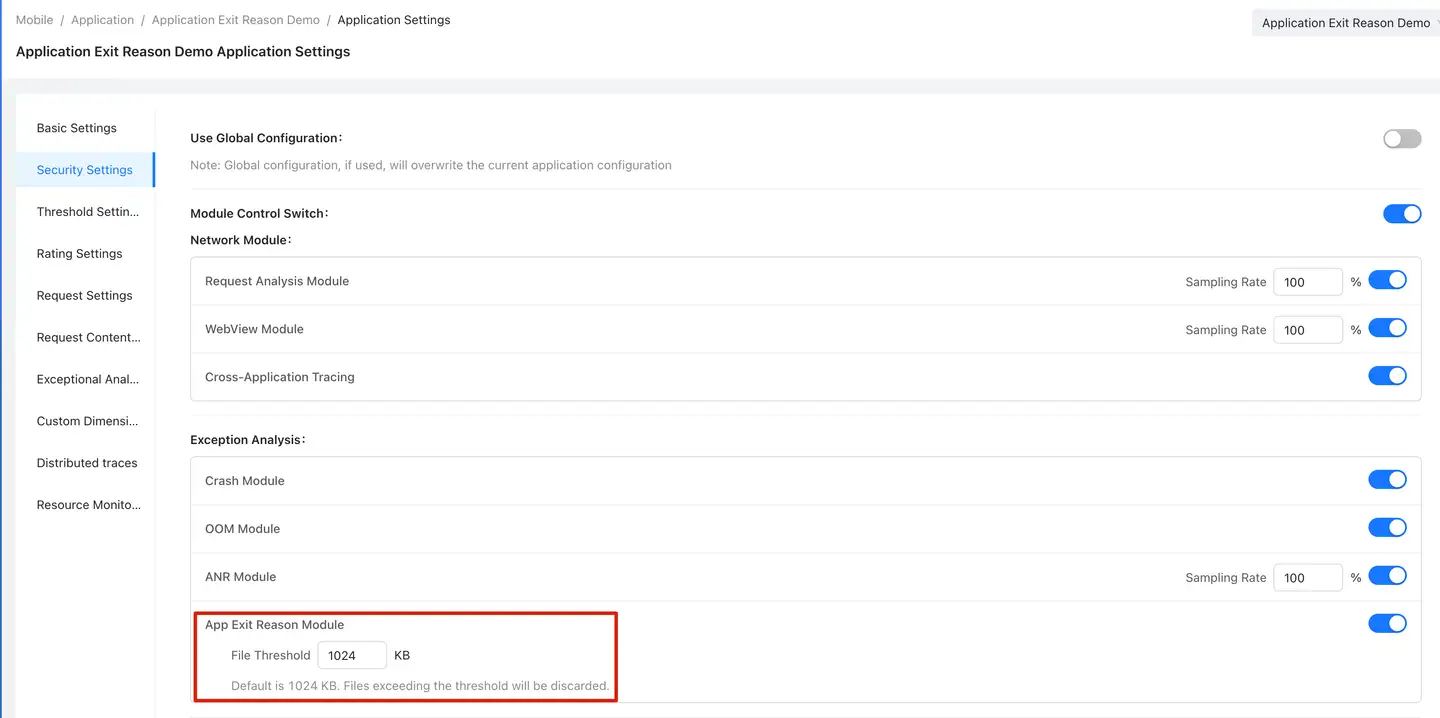
After the configuration is changed, you need to wait for the SDK to report new data before the corresponding analysis results are displayed on the page.
FAQ
Why is there no app exit reason data?
Check the following items:
- Whether the current app is an Android app.
- Whether the device system version is Android 11/API 30 or later.
- Whether Exit Reasons collection has been enabled in app settings.
- Whether exit reasons were reported within the current time range.
- Whether the filters are too narrow. Try clearing the filters and viewing the data again.
Why are some exit subreasons displayed as unknown subreason?
When the system does not return a clear subreason, or the platform has not yet recognized the subreason, it is displayed as unknown subreason. You can still continue troubleshooting with the primary exit reason, description, exit signal, device context data, and exception tracing.
How should I understand Exit Rate?
Exit Rate measures the proportion of app exits among app launches. An increase in this rate usually means that app exit issues have increased within the current time range. Analyze it further with exit reason type, app version, operating system, and device model.
Does user-requested termination always mean the user actively exited?
Not necessarily. User-requested termination usually means the app was terminated by the user or by the system in a way related to a user request, such as force stop or removal from recent tasks. Use the exit subreason, exception tracing, and session details to determine the specific scenario.
What is the difference between Java crash and Native crash?
A Java crash usually means the process exited due to an exception in the Java layer. A Native crash usually means the process exited due to a crash in the native layer. Only Native crashes on Android 12/API 31 and later support carrying Dump files.
Why is there no Dump file?
Only ANR exits and Native crashes on Android 12/API 31 and later include Dump files. Other exit types, or Native crashes on versions earlier than Android 12, do not provide Dump file downloads by default.
Troubleshooting Suggestions
When exit issues increase, we recommend investigating in the following order:
- First check the metric cards to confirm whether exits, exit rate, and users with exits are abnormal.
- Confirm the time point of the abnormal increase in trend analysis.
- Switch to dimension analysis to check whether the issue is concentrated in a specific exit reason, app version, operating system, or device model.
- Open the details of high-proportion issues from the app exit reason list.
- Review the exception list and device context data to confirm affected users and device environments.
- Review exit information, exception tracing, and session details to locate the operation path before the exit.
- If an associated file exists, download the Dump file for further analysis.